Create Perfect ESL Listening Exercises in 60 Seconds
Generate custom, CEFR-graded, multi-speaker English dialogues with British, American, and Australian voices. Download instant MP3s or publish student podcast feeds.
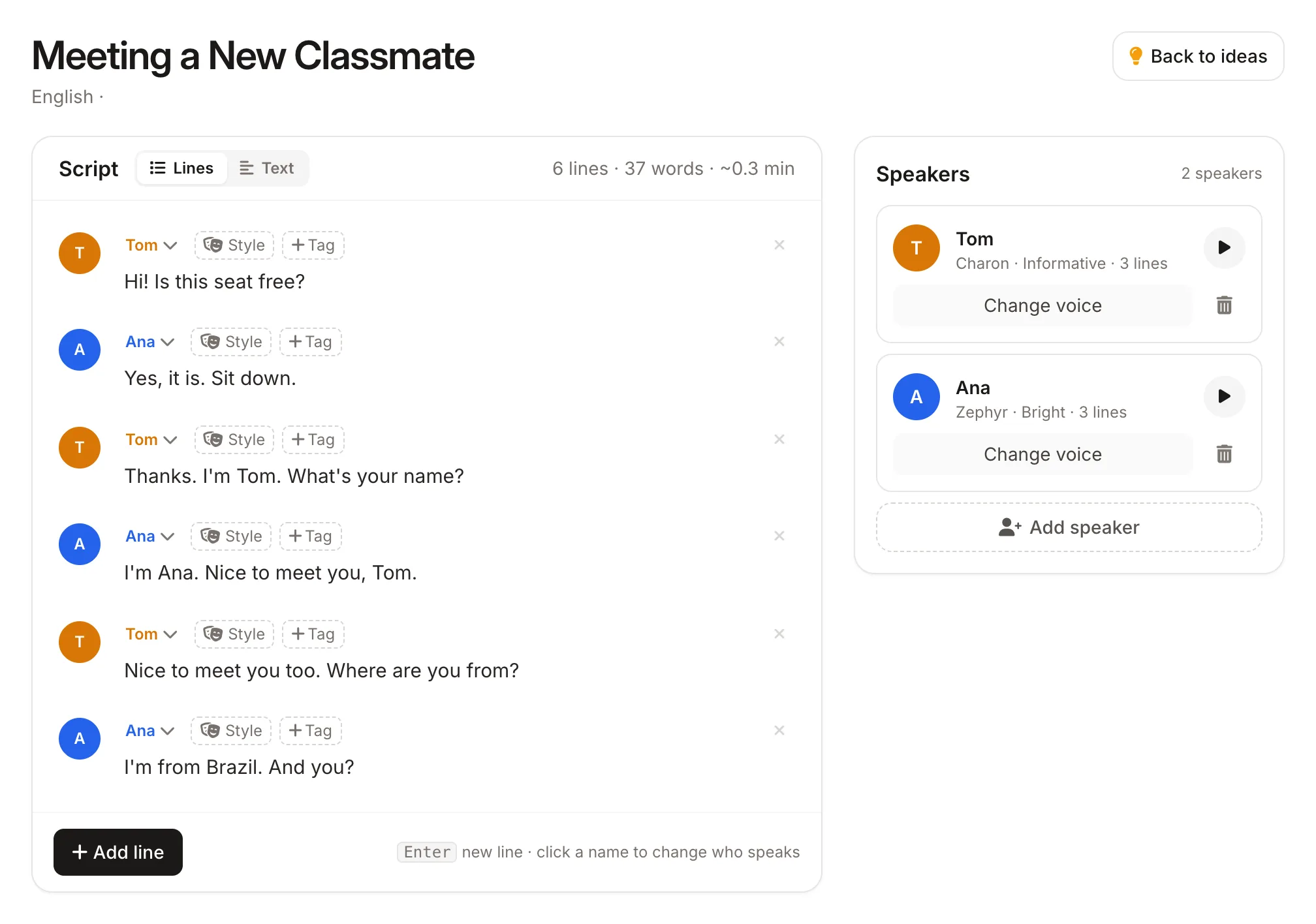
The Old Way vs. The ZenMic Way
Why thousands of ESL tutors and schools are switching to generative AI listening tracks.
Static, Frustrating & Time-Consuming
- ✕ 30+ mins wasted scouring YouTube and ESL websites for audio that matches your specific grammar point.
- ✕ Outdated textbook CDs with robotic intonation, unnatural pauses, and irrelevant vocabulary.
- ✕ Zero script editing: You cannot fix awkward phrases or inject your lesson's target keywords.
- ✕ Awkward self-recording: Recording your own voice on your phone with background noise and microphone anxiety.
Instant, Graded & 100% Customizable
- ✓ 60-second generation: Type any scenario ("At the doctor", "B1 Job interview") and get ready audio.
- ✓ Full word-for-word script editing: Review, insert vocabulary, or tailor dialogues before generating audio.
- ✓ Mix native accents: Pair a British interviewer with an American candidate for authentic IELTS/TOEFL practice.
- ✓ One-click export: Download MP3s for LMS, or publish live podcast RSS feeds for student subscriptions.
Audio Calibrated for Every CEFR Level
ZenMic automatically shapes dialogue pacing, syntax complexity, and vocabulary density to match international language standards.
Beginner
Simple phrases & slow cadence
From Idea to Classroom Audio in 3 Steps
Free ideas and script generation, seamless 1-click audio synthesis.
Prompt or Pick a Scenario
Choose your CEFR level, accents (US, UK, AUS), and topic in our free generator.
Use Free Tool →Review & Fine-Tune Script
Edit any phrase, insert your target grammar vocabulary, or adjust pacing tags like [slow].
Full Script Editing ControlGenerate Audio & Export MP3
One click sends your script to Studio. Synthesize multi-speaker MP3s for class or Spotify.
Open Studio 🎧 →Built for Every ESL Teaching Context
Whether preparing students for exams or teaching private online lessons.
IELTS Exam Prep
Simulate authentic IELTS Section 1-4 tests by mixing British and Australian native speakers.
IELTS Audio Generator →TOEFL & Academic English
Create academic campus dialogues, office hour discussions, and micro-lectures.
TOEFL Passage Creator →Everyday Classroom Dialogues
Generate situational roleplays: ordering food, hotel check-ins, medical visits, and travel.
Browse Dialogue Library →Pronunciation & Shadowing
Generate hyper-clear, consistent audio tracks for student phonetics and sentence shadowing practice.
Listening Audio Specs →Online Tutors (iTalki / Preply)
Give your 1-on-1 students personalized listening homework tailored to their exact mistakes.
Generate Lesson Script →Classroom Podcast Series
Publish weekly audio lessons to Spotify and Apple Podcasts via automatic RSS feeds.
Teacher Podcast Guide →Start Generating Now — No Account Required
Create free scripts and listening passages, then send them to Studio for audio synthesis.
ESL Dialogue Generator
Generate CEFR-graded (A1-C1) 2-speaker dialogues in seconds.
Open Tool →Graded Listening Generator
Generate level-calibrated reading texts with 3 comprehension questions.
Open Tool →IELTS Listening Maker
Create authentic Section 1-4 practice audio with British/AUS voices.
Open Tool →TOEFL Practice Audio
Generate American academic listening passages and campus conversations.
Open Tool →
"The output from ZenMic is even better than the original test materials in terms of clarity and sound quality… I can see this platform as a real educational platform for ESL."
Frequently Asked Questions
Everything language educators need to know about ZenMic.
Is ZenMic free for ESL teachers?
Yes. Our ESL Dialogue Generator and Graded Listening Generator are 100% free with no sign-up. Free accounts include credits every month to generate multi-speaker audio tracks and download MP3s.
What CEFR levels does ZenMic support?
All CEFR levels from A1 (Beginner) through C2 (Mastery). The AI tailors vocabulary, grammatical constructions, and speaking speed to match the target level.
Can I use ZenMic for IELTS and TOEFL listening practice?
Yes. You can assign different regional accents (British, Australian, American) to different speakers in the same track, which is essential for authentic IELTS and TOEFL simulation.
Can I edit the script before generating the audio?
Yes! Unlike NotebookLM (which generates black-box un-editable audio), ZenMic gives you complete script editing control before rendering the audio track.
Can I upload generated audio to Google Classroom, Canvas, or Moodle?
Yes. Every episode is downloadable as a high-quality MP3 file that is LMS-compatible and easy to share with students.
How do I control speed for beginner (A1/A2) students?
In ZenMic Studio, you can insert speed cues like [slow] or [pauses] directly into the script to ensure beginner learners can clearly hear word boundaries.
Can I publish an automated podcast feed for my students?
Yes. Every ZenMic show provides a podcast RSS feed that you can connect to Spotify for Podcasters or Apple Podcasts so students automatically get weekly audio updates.
Related ESL Teacher Guides & Resources
Recently Made on ZenMic
Real audios ZenMic users created in the last few weeks. Press play to hear one.
39 sec · Yesterday · ESL Listening Dialogue Generator
2 min · 4 days ago · ESL Listening Dialogue Generator
1 min · 7 days ago · ESL Listening Dialogue Generator
1 min · 5 days ago · ESL Listening Dialogue Generator
Stop Searching. Start Creating.
Your next CEFR-graded listening exercise is 60 seconds away. Free to generate, no recording equipment needed.