How to Start a Podcast for Free in 2026
Updated October 2026 · By the ZenMic Team
The short answer
You can start a podcast for $0 by recording on your phone or making the audio with an AI tool's free plan, editing in Audacity, hosting on a free host like Spotify for Creators, and submitting the free RSS feed to Spotify and Apple Podcasts. Nothing in that path needs a card.
- Pick a topic and a name
- Write the first script or outline
- Make the audio for $0
- Make square cover art
- Host it free and get an RSS feed
- Submit the feed to Spotify and Apple
- Promote with free channels
Or start from an idea (opens the studio with it filled in):
What does it cost to start a podcast?
On the free stack below, every line comes to zero. Want to price a paid setup instead? Try the podcast cost calculator.
What free tools do you need to start a podcast?
One free tool per job is enough. This is the full $0 stack, with the limit you will hit first on each free plan.
| Step | Free tool | What it does | Free limit |
|---|---|---|---|
| Idea and name | ZenMic Podcast Name Generator | Suggests podcast names for any topic | Free, no sign-up |
| Script | ZenMic Podcast Script Generator | Drafts a two-host script from a topic | Free |
| Audio (AI, no mic) | ZenMic Studio | Writes a multi-speaker script, voices it, exports MP3 | Free trial: 5 min of audio, 30 days, no card |
| Audio (recorded) | Phone voice recorder + Audacity | Record, cut mistakes, reduce noise | Free, open source, no limits |
| Cover art | ZenMic Cover Art Prompt + a free image tool | Writes the image prompt; Canva, ChatGPT or Gemini make the image | Prompt tool free; image tools have daily limits that vary |
| Hosting + RSS feed | Spotify for Creators | Hosts episodes and gives you an RSS feed | Free, no published storage cap |
| Hosting + RSS feed | ZenMic project feed | RSS feed for episodes you make in ZenMic | Included with every project, free trial too |
| Distribution | Spotify, Apple Podcasts Connect, Amazon Music | Lists your show in the big apps | Free to submit |
| Show notes | ZenMic Show Notes Generator | Episode summary, key points, timestamps | Free, no sign-up |
| Clips for social | ZenMic Clip Finder | Picks shareable moments from a transcript | Free, no sign-up |
Third-party limits are as listed by each provider at the time of writing and change often. Check the provider's pricing page before you commit.
How do you start a podcast for free, step by step?
Pick a topic and a name
$0Choose a narrow topic you can make 10 episodes about, then pick a short name. Free generators help if you are stuck.
Brainstorm with the free podcast topic generator, then try the podcast name generator and check the name is not already taken on Spotify.
Write the first script or outline
$0Write bullet points for a recorded show, or let a free AI script generator draft a full two-host script you can edit.
The free AI podcast script generator writes a two-host draft from one line. Or see the sample pilot script further down.
Make the audio for $0
$0Record on your phone and clean it up in Audacity, or turn a topic or text into a voiced episode with the ZenMic free trial. No microphone needed.
Not recording? Read how to make a podcast without a microphone, or open the free AI podcast generator. In ZenMic the AI writes the script, you edit it, and it voices each speaker.
Make square cover art
$0Create a 1400 to 3000 pixel square JPG or PNG with a free design tool or a free AI image generator.
Describe your show to the free cover art prompt generator, paste the prompt into a free image tool, and check the result at thumbnail size.
Host it free and get an RSS feed
$0Use a free host such as Spotify for Creators, or a ZenMic project, which gives every project its own RSS feed.
Compare free hosts in the table below. ZenMic projects get a feed automatically: see how the free podcast RSS feed works.
Submit the feed to Spotify and Apple
$0Paste the RSS feed into Spotify for Creators and Apple Podcasts Connect. Both are free.
Our guide on how to start a podcast on Spotify walks through the Spotify for Creators screens. Apple works the same way at Apple Podcasts Connect.
Promote with free channels
$0Share each episode where you already post, cut short captioned clips, and keep a schedule you can sustain.
The free clip finder picks shareable moments; the show notes generator writes the episode description.
Where can you host a podcast for free?
Podcast hosting stores your audio and publishes an RSS feed, the URL that Spotify and Apple read to find your episodes. These hosts have a free option:
| Host | Free limit | Best for |
|---|---|---|
| Spotify for Creators | Free, no published storage cap | Recorded shows that want Spotify's own features |
| ZenMic | RSS feed on every project; free trial includes 5 min of audio | Shows made without recording (AI script and voices) |
| Buzzsprout | 2 hours of uploads a month; episodes removed after 90 days | Trying a host before paying |
| Podbean | 5 hours of total storage | A short series |
Limits as listed by each host at the time of writing; check before you commit.
How do you get a free RSS feed for your podcast?
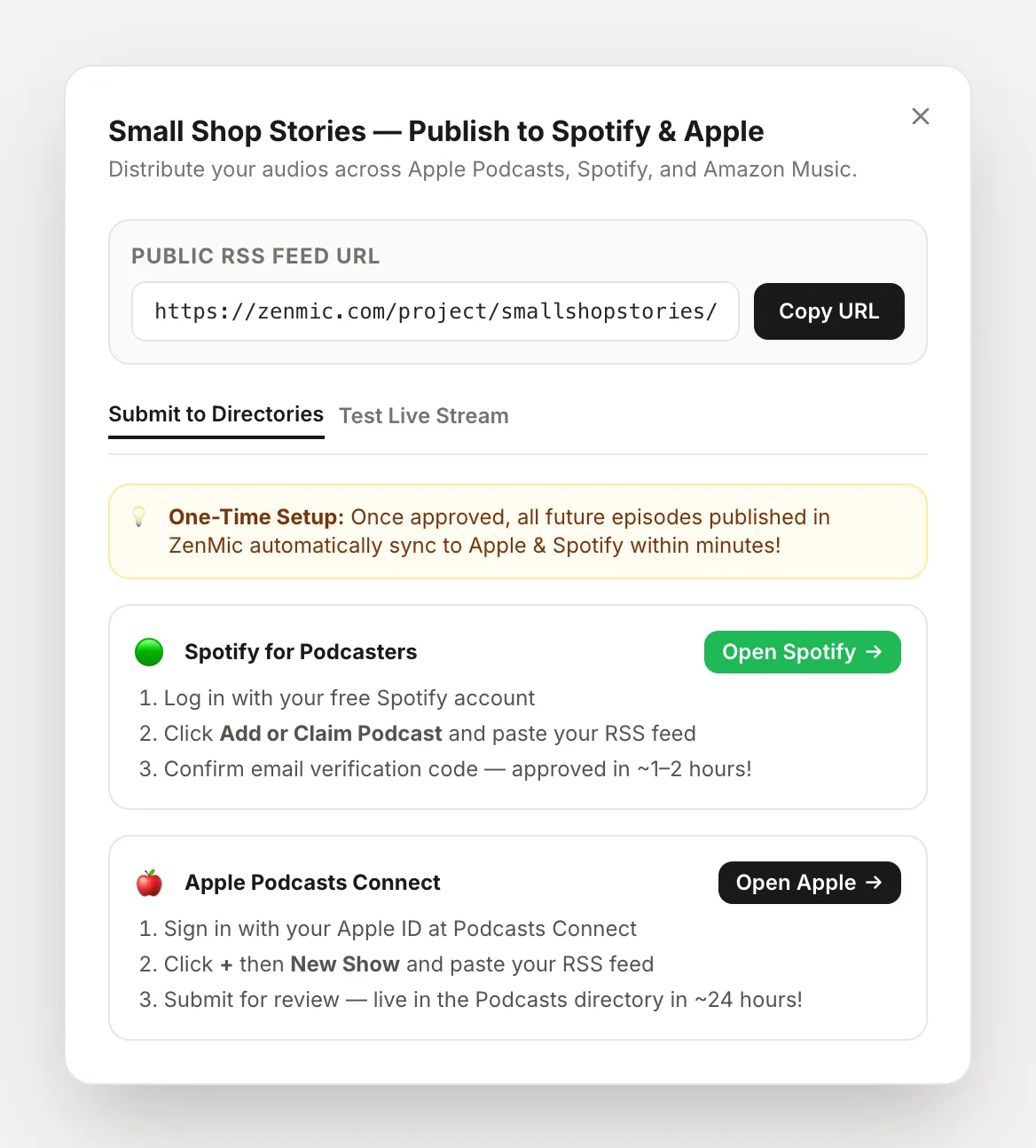
Every free host above creates one for you. In ZenMic, each project has its own feed from the moment you create it. Open the project in the studio and click Publish to Spotify & Apple to copy the URL, test it, and open each directory's submit page. Episodes you mark as public in the project appear in the feed on their own.
What should a free first episode sound like?
Keep the pilot short: who the show is for, what each episode delivers, and what is coming next. Here is a two-host pilot you can use as a model. Generate This Audio opens the studio with the script filled in so you can change it and have it voiced.
Sample pilot episode script (2 speakers)
What do you give up on a free plan?
Free covers launch. These are the trade-offs you should expect:
| Area | Free stack | Paid |
|---|---|---|
| Hosting | Upload or storage caps on some hosts | Higher or no caps |
| AI audio (ZenMic) | 5-minute trial; short audio watermark at the end, "Made with ZenMic" line in feed show notes | Monthly minutes, no watermark |
| Recorded audio quality | Phone mic, fine in a quiet room | Cleaner with a dedicated mic |
| Analytics | Basic plays per episode | More detail on some hosts |
| Website | Host's show page | Custom domain on some hosts |
When should you stop using free tools?
Only when a free limit actually gets in the way. Typical moments, before you look at paid plans:
You hit the cap
You publish more hours than the free host allows, or want AI episodes every week.
A sponsor asks for stats
Detailed audience numbers help you price ads; some hosts keep them behind paid plans.
You have shipped 10 episodes
By then you know your format and can spend money where it changes the result.
Frequently Asked Questions
Yes. Recording on a phone, editing in Audacity, hosting on Spotify for Creators and listing on Spotify and Apple Podcasts all cost nothing. If you do not want to record, the ZenMic free trial makes your first AI-voiced episodes and gives you an RSS feed without paying.
Spotify for Creators is the most generous: free hosting with no published storage cap, plus an RSS feed you can submit to Apple Podcasts. Buzzsprout and Podbean have free plans with time or storage limits. If you make episodes in ZenMic, each project already has its own RSS feed.
No. Submitting a show to Spotify (through Spotify for Creators), Apple Podcasts (through Apple Podcasts Connect) and Amazon Music is free. Apple needs an Apple Account; Spotify needs a Spotify account.
Yes. An AI podcast generator such as ZenMic turns a topic or pasted text into a multi-speaker script, voices it and gives you an MP3, so there is nothing to record. The ZenMic free trial includes 5 minutes of audio over 30 days, enough for a trailer and a pilot.
Limits. Free hosts cap upload hours or delete older episodes, free AI tools cap minutes or daily use, and free plans often add a watermark. On a free ZenMic account, each audio ends with a short spoken ZenMic watermark and the RSS show notes include a "Made with ZenMic" line; paid plans remove both.
Use a free design tool such as Canva, or describe your show to the ZenMic Cover Art Prompt Generator and paste the prompt into a free AI image tool. Export a square JPG or PNG between 1400 and 3000 pixels.
When a free limit is actually in your way: you publish more hours than the free host allows, you want to make AI episodes every week, or a sponsor asks for detailed stats. Many shows run for months on a free stack first.
Make a podcast episode for $0
Type a topic. The AI writes a multi-speaker script, you edit it, it voices it. MP3 plus an RSS feed for Spotify.
Make your first episodeReady to make your first free episode?
Start from a topic or paste your notes. ZenMic writes the script, voices every speaker and gives you an RSS feed for Spotify and Apple.
Make your first episode now