ZenMic vs NotebookLM: The Real Difference
NotebookLM is for your notes. ZenMic is for your audience. If you're building an actual podcast show, creating branded content, or need full script control over what gets said — here's why creators choose ZenMic.
Feature-by-Feature Comparison
See exactly how the two tools stack up across every dimension that matters for creating podcast content.
| Feature | NotebookLM | ZenMic |
|---|---|---|
| Script Control | ✗ No editing | ✓ Edit every line |
| Number of Voices | 2 Fixed (1 male, 1 female) | 30+ Assignable per host |
| Voice Customization | ✗ No tone/pace control | ✓ Tone, pacing, style |
| RSS Feed / Podcast Distribution | ✗ Stream only | ✓ Apple Podcasts, Spotify |
| API Access | ✗ No public API | ✓ REST API |
| MP3 Download | ✗ Streaming only | ✓ Full MP3 download |
| Multilingual Audio | ⬜ Recently added, limited | ✓ Multiple languages live |
| Content Sources | Google Docs, PDFs, URLs, Slides | Topic, text, PDF, images, HTML, RSS, docx |
| Background Music / SFX | ✗ | Coming soon |
| Max Audio Length | ~30 min Hard cap | Per plan 10-60+ min/month |
| Enterprise / Specialist Content | ✗ General research only | ✓ Legal, medical, financial |
| Pricing | Free / $20/mo Plus $240/yr for higher limits | Free / $19/mo or $99/yr 4-6x less than Plus |
| Background Music / SFX | ✗ None | ⬜ Coming soon |
* NotebookLM Audio Overviews added multilingual support (Dec 2025) and voice customization (Jan 2026). Features verified as of June 2026.
7 Things NotebookLM Can't Do
NotebookLM is a great research tool with a cool audio feature. ZenMic is a podcast production platform. Here's what that means in practice.
1. Full Script Control — NotebookLM Has None
TL;DR: NotebookLM generates audio automatically with no way to edit what gets said. ZenMic lets you read and edit every line of the script before audio is generated.
NotebookLM generates audio automatically. You get exactly what the AI decides to say — no edits, no rewrites, no control over emphasis or accuracy. If it hallucinates a statistic or misses a key point, you must regenerate from scratch with modified sources and hope for the best.
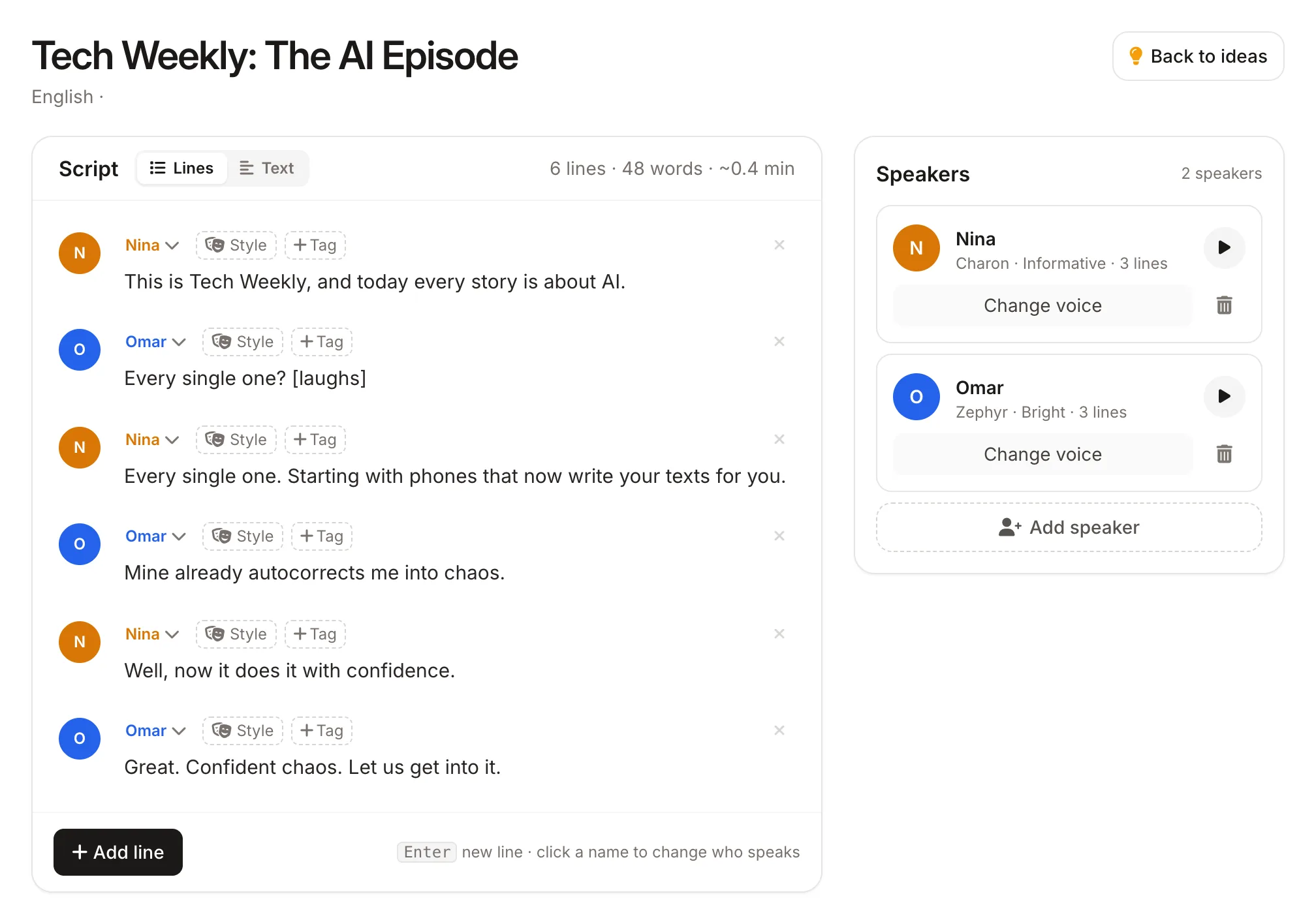
ZenMic lets you read, edit, and structure every line before generation. Fix facts. Adjust the tone. Add context the AI missed. Structure the conversation exactly how you want it. You are never at the mercy of an opaque black box.
💡 The bottom line: NotebookLM is a "generate and hope" tool. ZenMic is a "write, review, then generate" tool. For any content that matters — client work, branded shows, educational content — control is essential.
2. 30+ Assignable Voices vs. Two Fixed Hosts
TL;DR: NotebookLM has exactly 2 fixed voices with no customization. ZenMic offers 30+ voices you can assign to different speakers, with full tone and style control.
NotebookLM has exactly two voices: one male host and one female host. You cannot change who they are, how they sound, or how many speakers participate. Every audio overview sounds the same.
ZenMic offers 30+ voices that you can assign per host, per segment, or per line. Mix and match genders, accents, and styles. Create interview formats with distinct guests. Build panel discussions with multiple unique speakers. Your show has its own identity.
3. Real Podcast Distribution (RSS Feeds)
TL;DR: NotebookLM audio is stream-only inside the app — it cannot be published as a podcast. ZenMic generates proper RSS feeds that distribute directly to Spotify and Apple Podcasts.
NotebookLM audio is ephemeral — you can stream it inside the app, but you cannot publish it as an actual podcast. No RSS feed, no Spotify, no Apple Podcasts. It's a listen-once experience.
ZenMic generates proper podcast RSS feeds for every show you create. Submit your feed URL to Spotify for Podcasters, Apple Podcasts Connect, or any podcatcher — and your episodes appear automatically to subscribers. This turns ZenMic from a "listen-once" tool into an actual podcast production platform.
- Auto-generated RSS feed for every show
- Publish to Spotify, Apple Podcasts, Pocket Casts, and more
- Turn your blog or Substack into an auto-updating podcast show
4. A Full REST API — NotebookLM Has None
TL;DR: NotebookLM has no public API and cannot be integrated into any workflow or product. ZenMic offers a complete REST API for script generation, audio synthesis, and podcast management.
NotebookLM has no public API. You cannot integrate it into your workflow, automate content production, or build it into your own product. It's a self-contained app that does one thing.
ZenMic offers a REST API for Enterprise customers with endpoints for script generation, audio synthesis, and podcast management. Build automated content pipelines. Integrate audio generation into your CMS. Create a white-label podcast product for your clients. The API gives you programmatic control over everything the web app can do.
5. Downloadable MP3s — Not Just Streaming
TL;DR: NotebookLM audio is streaming-only inside Google's app with no way to download the file. ZenMic produces a downloadable MP3 for every episode you create.
NotebookLM only streams audio in the browser. You cannot download or save the file. Your audio lives inside Google's ecosystem and nowhere else.
With ZenMic, every episode is a downloadable MP3 file. Use it anywhere — embed on your website, distribute via email, upload to YouTube, archive in your content library. Your audio belongs to you.
6. Multilingual, Enterprise-Grade Content
TL;DR: NotebookLM's non-English audio support is limited and inconsistent. ZenMic supports multiple languages including Hindi, Arabic, French, and Italian, with accurate handling of specialist and regulated industry terminology.
NotebookLM processes multilingual sources but only recently began generating audio in non-English languages (Dec 2025). Quality is inconsistent for less common languages, and there's no support for specialist terminology.
ZenMic supports multiple languages out of the box — including Hindi, Arabic, French, Italian, and more. Our platform handles specialist terminology accurately: legal, medical, financial, and technical content is processed with the precision that regulated industries demand.
7. Better Value: $99/yr vs $240/yr
TL;DR: NotebookLM Plus costs $240/year and still lacks script editing, RSS feeds, an API, and MP3 downloads. ZenMic includes all of these features at a significantly lower price point.
NotebookLM's free tier is limited to 3 audio overviews per day and 25 sources per notebook. For anything more, you need NotebookLM Plus at $20/month ($240/year) — and it still lacks script control, RSS feeds, an API, or MP3 downloads.
ZenMic's Monthly plan is $19/month and Yearly plan is $99/year. Both include script editing, 30+ voices, RSS feeds, API access, and MP3 downloads — features NotebookLM doesn't offer at any price point.
- ✗ No script control
- ✗ No RSS / distribution
- ✗ No API
- ✓ Full script control
- ✓ RSS / Spotify / Apple
- ✓ REST API access
Which Tool Is Right for You?
Both tools are excellent — but for different audiences. Here's our honest take on who should use which.
NotebookLM is for you if...
- 1 You want a quick audio summary of research documents
- 2 You're comfortable with no editing and letting AI decide what to say
- 3 You don't need to publish to Spotify or Apple Podcasts
- 4 You're already deep in the Google ecosystem (Docs, Drive)
- 5 Your needs are purely academic or research-related
ZenMic is for you if...
- 1 You want to actually publish a podcast on Spotify, Apple, or any platform
- 2 You need control over the script — edit, refine, and fix before audio
- 3 You want custom voices beyond the same two hosts everyone gets
- 4 You're a developer or business that needs API integration
- 5 You create content in multiple languages or regulated industries
- 6 You want to repurpose blogs, newsletters, and PDFs into podcast episodes
- 7 You want better value — full features starting at $19/mo vs $240/yr
Quick Truths About Both Tools
Is NotebookLM free?
Yes, there's a free tier with 3 audio overviews/day and 25 sources per notebook. But if you need more, Plus is $20/month ($240/year).
Can you edit NotebookLM audio?
No. Once generated, you can only regenerate with modified sources. There is no script-level editing at all.
Can you download NotebookLM audio?
No — streaming only inside the app. ZenMic provides full MP3 downloads.
Does NotebookLM have an API?
No. ZenMic offers a complete REST API for developers who want to build audio into their products.
Can ZenMic work with PDFs?
Yes. ZenMic accepts PDFs, images, text files, HTML, CSV, and more. NotebookLM also supports PDFs and Google Docs.
Which tool is better for podcasts?
For one-off audio summaries, NotebookLM is fine. For an actual podcast show with RSS, distribution, and production control — ZenMic.
What People Use ZenMic For
Specialist terminology
Training audio for regulated industries, with an editable script so technical terms are read the way you want.
Publish to Spotify
Unlike NotebookLM, ZenMic gives you an RSS feed for Spotify and Apple Podcasts, plus a script editor so you can fix a line without regenerating everything.
Patient education audio
Turn patient information documents into clear audio that people can replay at home.
Frequently Asked Questions
Can ZenMic import my NotebookLM sources?
If you can export your sources from NotebookLM as PDFs or text files, you can upload them directly to ZenMic. ZenMic supports PDF, images, text files, HTML, CSV, XML, RTF, and Markdown — so most NotebookLM source types are compatible.
Does ZenMic have a free tier?
Yes. ZenMic offers a 30-day Free Trial with 5 minutes of audio. It's a great way to test the platform and see if it fits your workflow before committing to a paid plan.
How does voice quality compare?
Both tools use top-tier neural TTS. NotebookLM uses Google's DeepMind-based models. ZenMic uses Google's Gemini TTS (state-of-the-art). In practical use, both produce natural, human-like dialogue. The real difference is that ZenMic lets you choose from 30+ voices while NotebookLM gives you only two.
Can I generate audio in other languages?
Yes. ZenMic supports multiple languages including English, Hindi, Arabic, French, Italian, and more. NotebookLM recently added multilingual audio support (late 2025), but it's still being rolled out and quality varies.
What if I need custom voice cloning?
ZenMic has it built in. Clone your own voice from a 10–30 second recording, or design a brand-new voice from a description, and cast it next to AI voices. NotebookLM has no voice choice at all. See voice cloning →
Is NotebookLM better for research?
For academic research summarization with deep Google Docs integration, NotebookLM is a solid choice — if you're okay with no script control and no distribution. But if you want to turn that research into published podcast episodes with custom voices and full editorial control, ZenMic is the right tool.
Ready to Create Podcasts Your Way?
NotebookLM is free but limited. ZenMic gives you full control — script editing, 30+ voices, RSS feeds, API, and MP3 downloads — starting at just $19/month.
No credit card required. Free plan available.